What IPTV in the UK Means
IPTV in the UK refers to television content delivered over the internet rather than through traditional satellite or cable systems. Instead of relying on a dish or fixed broadcast schedule, viewers stream live channels, on-demand shows, and catch-up content directly through apps on devices like Firestick, smart TVs, smartphones, or laptops. For most households, this means more flexibility—watching what you want, when you want, without being tied to rigid TV packages.
Legal vs unlicensed IPTV
The most important distinction in the United Kingdom is between legal IPTV services and unlicensed ones. Legal IPTV providers operate with proper broadcasting rights and distribution agreements, similar to platforms like NOW TV or BBC iPlayer. These services ensure stable access, customer support, and compliance with UK regulations. On the other hand, unlicensed IPTV services often offer large channel lists at very low prices but without rights, which can lead to unreliable streams, sudden shutdowns, or legal risks for users.
A practical way to assess this is simple: if a service promises “everything” (all premium channels, sports, and films) for an unusually low price, it’s likely not operating legally. In contrast, legitimate IPTV services tend to be transparent about their content, pricing, and supported regions. This distinction matters not just for legality, but also for quality—licensed services generally deliver better uptime and consistent performance.
Devices supported: Firestick, Smart TV, mobile
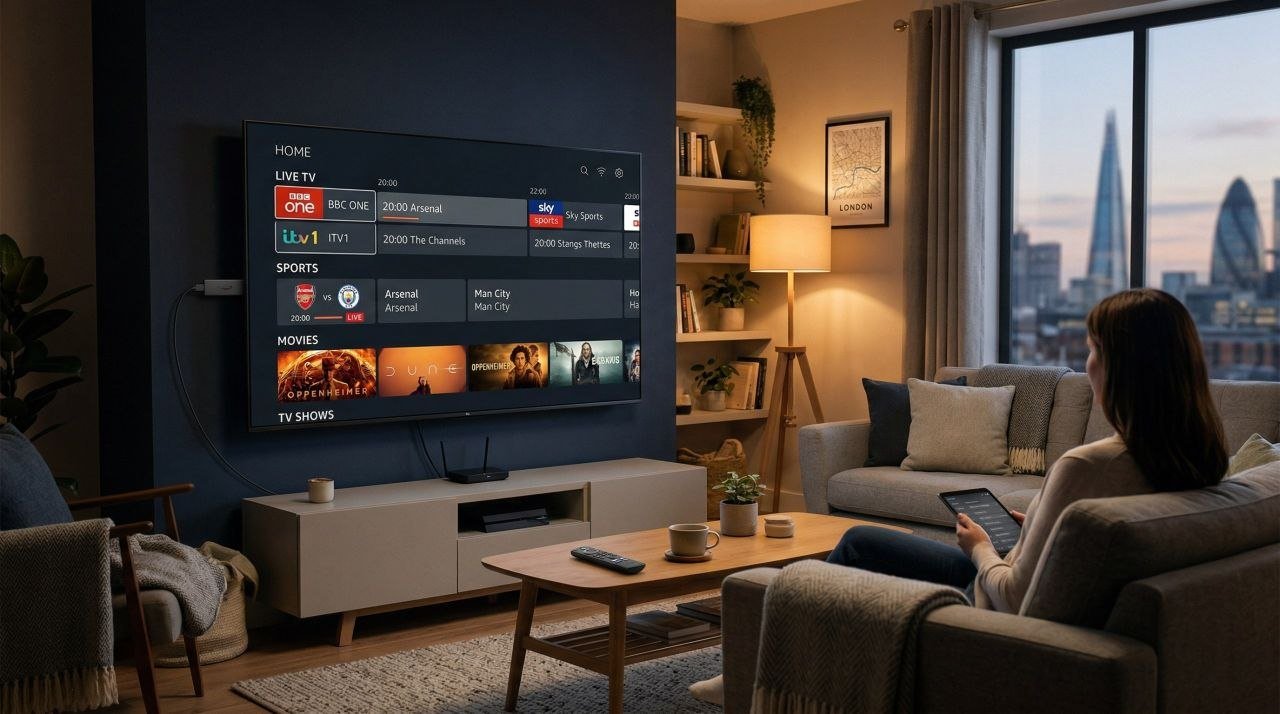
One of the main reasons IPTV in the UK has grown rapidly is its compatibility with everyday devices. A typical setup might involve an Amazon Firestick plugged into a TV, running an IPTV player app where users log in with their subscription. Smart TVs (Samsung, LG, Android TV), mobile devices, and even web browsers offer similar experiences, making it easy to switch between screens.
In a standard UK home, someone might watch live football on the living room TV via Firestick, while another person streams a series on their phone in a different room. This multi-device flexibility is a major shift from traditional TV. However, performance can vary depending on the device, app quality, and internet connection—so choosing the right combination is key to a smooth experience.
This is also where interface design matters. A well-built IPTV service should offer a clean electronic programme guide (EPG), fast channel switching, and organised categories. If navigation feels confusing or slow, daily use quickly becomes frustrating, regardless of how many channels are included.
[IMAGE 1 HERE]
From a user perspective, IPTV is less about technology and more about control. You’re not just replacing cable—you’re changing how you access entertainment. That means evaluating services not only on price or channel count, but also on reliability, ease of use, and whether they actually fit your viewing habits.
Legal vs unlicensed IPTV
Legal IPTV services in the United Kingdom are those that have proper licences to distribute TV channels, films, and on-demand content over the internet. Unlicensed IPTV, by contrast, streams the same type of content without permission from rights holders. The difference isn’t just technical—it directly affects reliability, legality, and the overall viewing experience for users.
Licensed IPTV services operate within UK broadcasting laws and are often backed by recognised platforms or providers. They typically offer a smaller but clearly defined content library, stable streaming quality, and customer support. For example, a legal service might provide UK channels, catch-up TV, and VOD content through a structured app on Firestick or smart TVs. Everything is transparent: pricing, features, and supported devices are clearly explained before you subscribe.
Unlicensed IPTV services, often marketed as “premium IPTV” or “iptv services” with thousands of channels, usually take a very different approach. They attract users with low-cost subscriptions and access to premium sports, films, and international channels in one package. While this might seem appealing, these services often rely on unstable sources. In real-world use, this can mean channels suddenly disappearing, buffering during peak times, or entire services going offline without notice.
A quick comparison can help clarify the difference:
- Legal IPTV: licensed content, consistent uptime, official apps, reliable support
- Unlicensed IPTV: unclear rights, frequent disruptions, app workarounds, limited support
From a user perspective, the risks of unlicensed services go beyond stream quality. Payment security, lack of refunds, and potential legal implications are all factors to consider. In the UK, internet providers and authorities actively monitor illegal distribution, which can lead to blocked streams or restricted access. This is why many users searching for “iptv united kingdom” solutions eventually prioritise stability and legitimacy over channel quantity.
If you’re evaluating a service, a few practical checks can save you time and frustration. Look for clear company information, verified payment methods, and realistic channel offerings. Avoid services that promise “everything” for a very low price or require unusual setup steps. A trustworthy british iptv provider should focus on usability and consistency, not just volume.
Ultimately, the goal isn’t just to find more channels—it’s to find a service that works every day without interruptions. For most households, that means choosing a legal, well-supported option that fits their devices and viewing habits, rather than chasing unrealistic deals.

How to Choose the Best IPTV UK
Choosing the best IPTV UK service means prioritising reliability, usability, and real-world performance over flashy promises. A good service should work smoothly on your main device, load channels quickly, and remain stable during peak hours. Instead of focusing on who offers the most content, the smarter approach is to choose a provider that delivers a consistent viewing experience every day.
Key features to look for
The first thing to evaluate is stream stability. A quality IPTV service should provide fast channel loading, minimal buffering, and a clean electronic programme guide (EPG). These features directly impact how enjoyable the service is to use. If switching between channels feels slow or the guide is confusing, even a large library becomes difficult to navigate.
Device compatibility is another key factor. Most UK users rely on Firestick, smart TVs, or Android-based devices, so the service should be fully optimised for these platforms. For example, an iptvuk setup that works perfectly on Firestick but struggles on mobile may not suit households that watch across multiple screens. The best services make it easy to move between devices without extra configuration.
You should also consider how the service performs during busy hours. Evening streaming—especially for sports or live events—is where weaker providers often fail. Many iptv services look good initially but struggle when server demand increases. Testing or researching performance during peak UK viewing times helps avoid frustration later.
What makes a premium IPTV service actually reliable
A genuine premium IPTV service is defined by consistency, not just features. It should deliver stable streams, responsive support, and a clear setup process. Services that provide proper guidance for installation on Firestick or smart TVs are often more user-focused and easier to maintain long term.
Transparency is another strong indicator of quality. A reliable provider clearly explains what is included in the subscription, how the service works, and what devices are supported. In contrast, vague descriptions or unrealistic claims are often signs of weaker services. When evaluating british iptv options, clarity and honesty are usually better indicators than aggressive marketing.
It’s also important to match the service to your viewing habits. A sports-focused viewer might prioritise live channel stability, while others may prefer strong VOD and catch-up features. The “best uk iptv” solution depends on how you use it, not just what it offers on paper.
Quick checklist before choosing:
- Works smoothly on Firestick or your main device
- Stable during evening streaming
- Clean and easy-to-use interface
- Clear pricing and support availability
A well-chosen service should feel effortless to use. If you find yourself constantly troubleshooting or adjusting settings, it’s usually a sign the provider isn’t the right fit.
Key features to look for
The key features to look for in any IPTV service are the ones that directly affect your daily viewing experience: stream stability, ease of navigation, content organisation, and device compatibility. These are what separate a service that feels smooth and reliable from one that becomes frustrating after a few days of use.
First, focus on stream quality and stability. A good IPTV service should load channels quickly and play without constant buffering, especially during peak evening hours in the UK. This is where many iptv services fail—everything may look fine at first, but performance drops when more users are online. If a provider mentions stable servers or “anti-freeze” technology, it should translate into real-world consistency, not just marketing language.
Next, look at the interface and usability. A clean electronic programme guide (EPG) is essential. You should be able to browse channels easily, see what’s currently playing, and switch between categories without delay. For example, on a Firestick, the navigation should feel smooth with a remote, not clunky or confusing. A well-designed layout saves time and makes the service feel like a proper replacement for traditional TV.
Content structure also matters more than raw numbers. Instead of focusing on how many channels are included, check how they are organised. Are UK channels grouped logically? Is there a clear separation between live TV, sports, and on-demand content? A good iptvuk setup makes it easy to find what you want within seconds, rather than scrolling endlessly through disorganised lists.
Finally, device compatibility and flexibility are crucial. Most users in the UK rely on Firestick, smart TVs, or mobile apps, so the service should work seamlessly across these platforms. If you switch between devices—watching on your TV at home and your phone on the go—the experience should remain consistent. A reliable british iptv provider ensures that setup is straightforward and doesn’t require constant adjustments.
Quick checklist:
- Fast channel loading with minimal buffering
- Clean and responsive EPG interface
- Well-organised content categories
- Smooth performance on Firestick and smart TVs
Choosing the right features means choosing a service you won’t have to think about once it’s set up. The best experience is one that simply works every time you turn it on.
Best IPTV for Firestick UK 2026
The best IPTV for Firestick UK in 2026 is not just about channel variety—it’s about smooth performance, easy navigation, and compatibility with how people actually watch TV at home. Firestick remains one of the most popular devices in the UK because it’s affordable, simple to set up, and works well with a wide range of IPTV apps. The right service should feel fast, stable, and effortless to use from the moment you open it.
What to check before installing
Before installing any IPTV service on a Firestick, start by checking app compatibility. Most providers rely on IPTV players rather than standalone apps, so you’ll often need to install a player first and then add your subscription details. A good provider will clearly guide you through this process and ensure their service works smoothly with common apps used on Firestick.
Performance is the next priority. Firestick devices are powerful enough for streaming, but they depend heavily on app optimisation and server quality. For example, if you’re watching live sports in the evening, a weak service may buffer or freeze at key moments. This is why many users search for “best iptv for firestick uk 2026”—they want something that performs reliably under real conditions, not just during testing.
Ease of use is just as important. The interface should be simple to navigate using the Firestick remote, with clear categories, quick channel switching, and a responsive EPG. If menus feel slow or cluttered, the experience quickly becomes frustrating. A well-optimised iptv for uk setup should feel similar to traditional TV, but with more flexibility.
Another factor to consider is long-term stability. Some iptv services work well initially but degrade over time due to server overload or poor maintenance. Look for providers that maintain consistent performance and offer support if something goes wrong. This is especially important if your Firestick is your main viewing device.
What to check before installing
Before installing any IPTV service, you should first make sure your setup—device, internet connection, and app choice—is ready to support smooth streaming. Many performance issues people experience later are actually caused by skipping these basic checks. Taking a few minutes upfront can save hours of frustration once you start using the service.
Start with your device and app compatibility. Most IPTV providers do not offer their own fully developed apps; instead, they rely on third-party players. This means you’ll need to install a compatible IPTV player on your Firestick, smart TV, or mobile device before adding your subscription details. A reliable provider will clearly tell you which apps to use and how to set them up. If instructions are unclear or overly complicated, that’s often a warning sign.
Your internet connection is just as important as the service itself. IPTV streaming depends on stable bandwidth, not just speed. For example, a household with multiple devices streaming at the same time may experience buffering even with a decent broadband plan. This is where many iptv services struggle, especially during peak UK evening hours. Testing your connection on the same device you plan to use—such as a Firestick connected to Wi-Fi—gives a more realistic idea of performance.
Another key point is account setup and access details. Before installation, check what the provider actually gives you: login credentials, a playlist URL, or app activation. Different services use different methods, and understanding this in advance avoids confusion during setup. A well-organised iptv sub should include clear instructions and immediate access without unnecessary delays.
You should also consider how the service fits your daily usage. For example, if you mainly watch live sports in the evening, stability during peak hours matters more than having thousands of channels. If you use multiple devices, make sure the service supports them without restrictions. A good iptv for uk setup should adapt to your routine, not force you to adjust how you watch.
Quick checklist before installing:
- Compatible IPTV player available for your device
- Stable home internet, tested on your main screen
- Clear login or activation method provided
- Service suited to your viewing habits
Taking these steps ensures that once you install the service, everything works as expected. It’s not just about getting IPTV running—it’s about getting it running properly from the start.

Why IPTV Buffers & Fixes
IPTV buffers mainly because of unstable connections, overloaded servers, or poorly optimised apps—not just slow internet. In most UK households, buffering happens during peak hours when many users are streaming at the same time. Understanding the real cause is key, because the fix depends on whether the issue comes from your setup or the provider itself.
Anti-freeze servers and ISP throttling
One of the most common terms you’ll see is “anti-freeze IPTV server UK.” In practice, this refers to servers that are better distributed and less overloaded, reducing interruptions during streaming. However, not all services that claim this actually deliver it. A well-built service should maintain stable streams even during high-demand periods like live sports evenings.
Another major factor is ISP behaviour. Some users worry about throttling—where internet providers may slow down certain types of traffic. In reality, what feels like throttling is often inconsistent Wi-Fi, router limitations, or too many devices using bandwidth at once. For example, streaming on a Firestick over weak Wi-Fi while others are gaming or downloading can easily cause buffering, even if your broadband speed seems high.
To identify the cause, it helps to test simple scenarios. Try switching from Wi-Fi to Ethernet if possible, or run a speed test directly on your streaming device. If buffering only happens at specific times (like evenings), it’s more likely related to server load from the IPTV provider rather than your connection. This is where many iptv services differ—some maintain performance under pressure, while others don’t.
App performance also plays a role. Certain IPTV players are better optimised for devices like Firestick and smart TVs. If your app is outdated or poorly designed, it can struggle to handle streams smoothly. Updating or switching apps can sometimes fix issues instantly without changing your subscription.
In real-world use, buffering is rarely caused by a single issue. It’s usually a combination of network conditions, device setup, and provider quality. That’s why quick fixes like restarting your device or router can help temporarily, but long-term stability depends on choosing a reliable service and optimising your setup.
Quick checklist to reduce buffering:
- Use a stable connection (preferably Ethernet or strong Wi-Fi)
- Avoid peak congestion on your home network
- Choose well-optimised IPTV apps for your device
- Test performance at different times of day
Fixing buffering isn’t about one solution—it’s about identifying where the weakness is and addressing it directly.
Anti-freeze servers and ISP throttling
Anti-freeze servers and ISP throttling are two of the most talked-about causes of IPTV buffering, but they’re often misunderstood. In simple terms, anti-freeze servers aim to reduce interruptions by distributing load more efficiently, while ISP throttling refers to potential slowdowns caused by your internet provider. In real use, buffering usually comes from a mix of server quality, home network conditions, and app performance—not just one single factor.
Anti-freeze servers and ISP throttling
When providers advertise “anti-freeze IPTV server UK,” they’re usually referring to better server infrastructure. This can include load balancing, multiple server locations, and optimised stream delivery. A strong setup means that even during high-demand periods—like live sports in the evening—streams remain stable. However, not all iptv services that claim this actually deliver consistent results. The real test is how the service performs during peak hours, not how it’s described.
On the other side, many users suspect ISP throttling when they experience buffering. While traffic management can exist, most issues in UK homes are caused by internal network limitations. For example, streaming on a Firestick over weak Wi-Fi while several devices are connected can lead to interruptions, even if your broadband speed seems sufficient. This is often mistaken for throttling when it’s actually network congestion.
A practical way to identify the difference is to test your setup. If buffering happens all the time, the issue may be your connection or device. If it mainly happens during busy hours, it’s more likely related to server load from your provider. You can also try switching networks or testing another app—small changes like these can reveal where the problem really comes from.
Device optimisation also plays a role. Some IPTV apps handle streams more efficiently than others, especially on Firestick or smart TVs. Keeping your app updated and choosing a well-supported player can reduce buffering significantly without changing your subscription. This is particularly important for users relying on iptv for uk viewing across multiple devices.
In practice, improving performance is about combining the right provider with a stable home setup. Anti-freeze technology helps, but it’s only part of the equation. The goal is to ensure that your network, device, and service all work together smoothly, especially during the times you watch most.
Quick takeaway:
- “Anti-freeze” depends on real server performance, not marketing claims
- Most buffering is caused by home network or peak-time load
- Testing your setup is the fastest way to find the real issue